For Mac, Windows, Linux, Chromebook and the web $99 launch price

Beautiful books,
made at your own desk.

Write or import your manuscript, pick a style, see it on real reader devices and print spreads, then generate store-ready ebooks and print PDFs. Fleuron is an app you install on your own Mac, Windows or Linux computer, and it works online or off. Your books stay on your own computer. Prefer the browser? There’s a web version too, including for Chromebooks.

$99 launch price, lifetime access. The regular price will be $139.

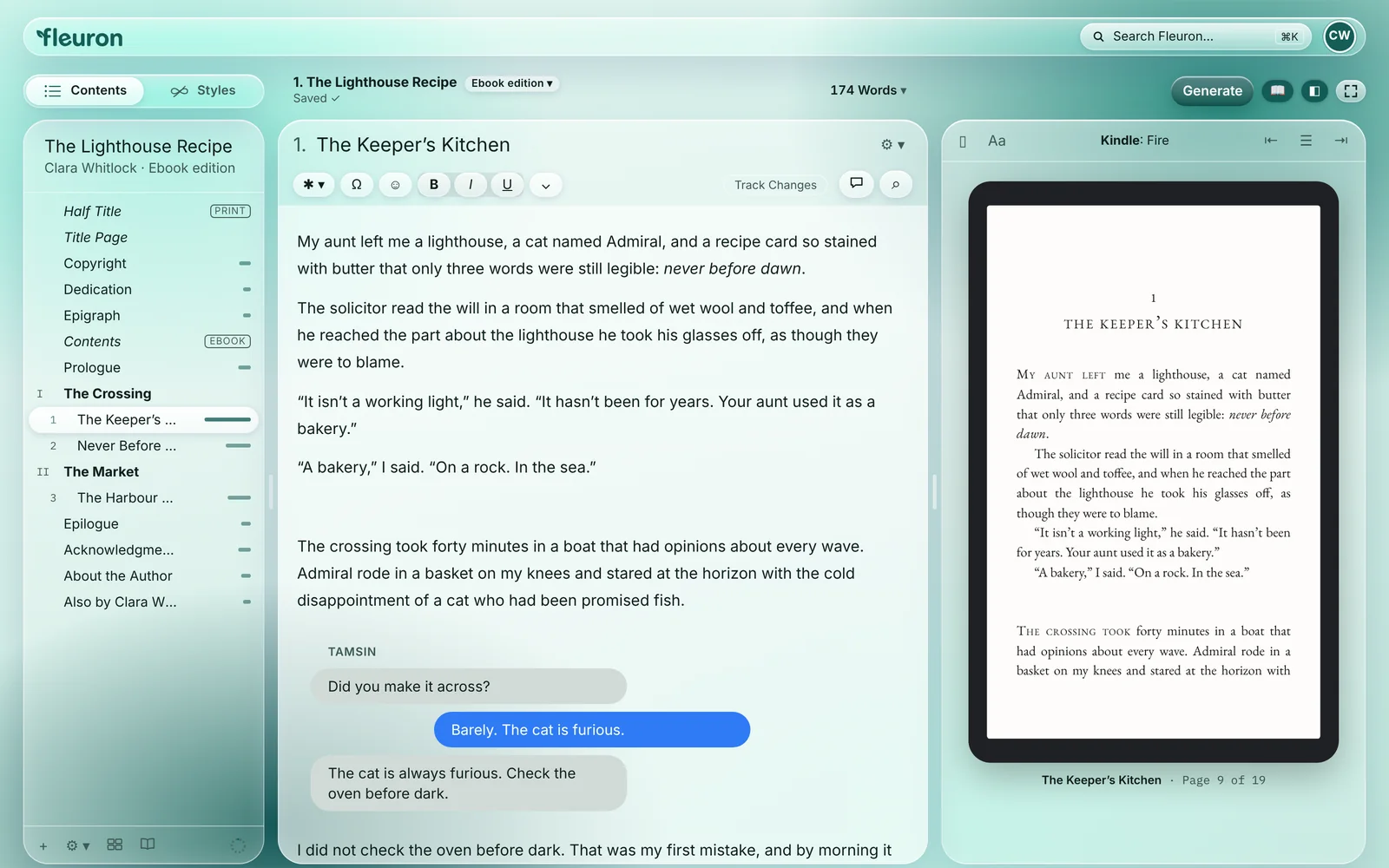
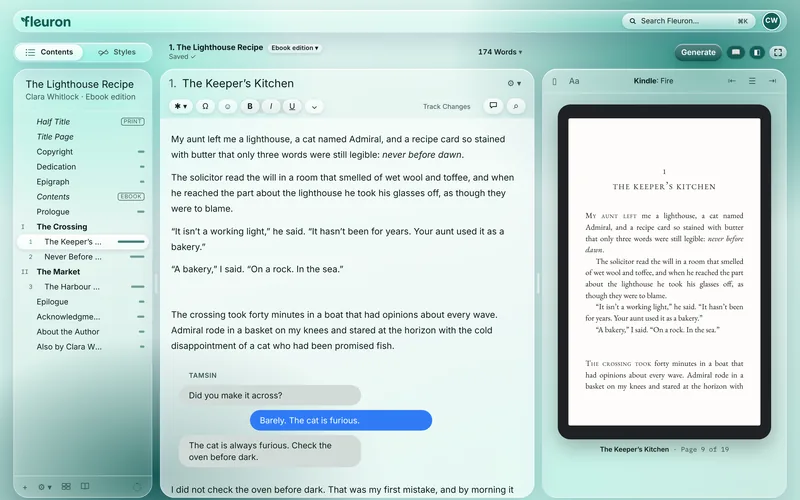
The Fleuron main screen in the Liquid Glass design with its Fleuron Teal theme. On the left, the contents of the sample book The Lighthouse Recipe, with The Keeper’s Kitchen selected. In the middle, that chapter open in the editor, including a text-message conversation. On the right, a live Kindle Fire preview of the same chapter.

Contents on the left, your words in the middle, a live Kindle preview on the right.

The problem

Most authors write in one program, format in another, and keep track of their characters, series and release dates somewhere else again.

The usual way

Several apps, files and lists

  • Draft in a word processor
  • Copy it into a formatter
  • Character notes in another file
  • Release dates in a spreadsheet

Fleuron

One app, from first draft to finished book

  • Write and plan
  • Format ebooks and print
  • A Codex for your characters and places
  • A Library with series shelves and a Release Plan

Any computer

Open your laptop. Open your book.

Fleuron runs on Mac, Windows and Linux, and in the browser on any computer, including a Chromebook. Use the computer you already write on.

The Fleuron main screen with the contents, the editor and a live Kindle preview.
  • Mac
  • Windows
  • Linux
  • Chromebook
  • Web

Your computer, your files

Your books, on your own computer.

Download Fleuron for Mac, Windows or Linux, or use the web version in your browser on any computer, including a Chromebook.

  • Your files, your foldersIn the desktop app, books are saved as Fleuron files (.fleuron) wherever you choose, including your own Dropbox, Google Drive, OneDrive or iCloud folder.
  • Works offlineThe desktop app writes, formats and generates without an internet connection. Adding a Google Font, or fetching a book's details from Amazon, needs one.
  • At home on your computerOn the Mac, a real Mac menu bar and Mac shortcuts. In the desktop app each book opens in its own window, and ⌘` switches between the Library and the book you were working on.
  • Automatic backupsA backup copy each time you save or close a book and every 15 minutes while you write, with a Manage Backups window.
  • Every computerMac, Windows and Linux apps, and a web version for Chromebooks and any other computer with a browser.
  • No AINo AI writing features, and nothing you write is sent to an AI company. Read our promise.

How it works

Three steps from manuscript to bookshelf.

  1. Step 1

    Import

    Open your Word file, Scrivener project or Vellum book, or a whole folder of books. Fleuron finds the chapters and helps you tidy what needs tidying.

    How importing works
  2. Step 2

    Style

    Pick one of 28 book styles, or build your own, and watch every chapter change in the live preview.

    See the styles
  3. Step 3

    Generate

    One click makes ebooks for every major store and a print-ready PDF for your paperback.

    See the stores

Everything Fleuron does today

One app, from first draft to finished book.

Every screenshot is the current app, in the Liquid Glass design with several of its colour themes, using the sample book The Lighthouse Recipe. The Library shows example books by made-up pen names. Tap any screenshot to see it larger.

Import

Start with the books you already have.

One Open button for everything. A Fleuron book opens; any other file joins your Library and opens. Choose several files at once, or drag them onto the window.

  • Open a whole folder: Fleuron finds the books in it, leaves notes, outlines and second copies of the same book out, and lets you tick what comes in.
  • Series from file names: books already in the Library can be sorted into their series in one step, too.
  • Chapters, parts, scene breaks, footnotes, endnotes, lists, pictures, verse, quotes and text conversations are recognised.
  • Check Your Import spots the little problems that come over from a word processor, with one-click fixes.
  • Reimport a new version of your Word file and keep everything you added in Fleuron. Before it replaces anything, Fleuron names each chapter you changed in Fleuron since the last import, so no edit is lost by surprise. Import Tips explain how to prepare a manuscript.

Files Fleuron opens

Word .docxScrivener .scrivVellum .vellumEPUBOpenDocumentRTFMarkdownHTMLPlain text

Series from file names

  • Iron Compass Book 3 TitleBook 3 of Iron Compass
  • Title (Iron Compass #3)Book 3 of Iron Compass

What Check Your Import looks for

  • Missed chapter breaks
  • Very long or very short chapters
  • Typed list numbers
  • Symbol lines meant as scene breaks
  • Blank lines between paragraphs
  • Double spaces
  • Straight quotes
  • Double hyphens
  • Underlining
  • Pictures without descriptions

Each one comes with a one-click fix.

Book styles

Make it look professionally typeset.

Choose a style and every chapter opening, first line and scene break changes together. No design skills needed.

  • 28 book styles in Popular, Serif, Sans serif, Script and Accessible, including a dyslexia-friendly style.
  • Theme builder: chapter number and title fonts, sizes, weights, letter spacing, colours, frames, lines, ornaments and alignment. Save your mix as your own style.
  • Any font anywhere: about 100 built-in fonts, the Google Fonts library to browse and add (adding a font needs an internet connection), and your own fonts (TTF, OTF or a zip), all embedded in your ebooks and print.
  • Show Only In: mark any passage for ebooks only, print only, or one store's ebook, such as a QR code in print or a store-specific link. It shows as a labelled box while you write.
  • Low resolution warnings: a picture too small to print or display sharply is marked in the editor, with the size it needs.
  • Drop caps, small-caps openings, ornamental scene breaks, heading images, and full-page backgrounds and borders for print.
  • Text-message bubbles, handwritten-style notes, verse, tables, code blocks and Note, Tip and Warning boxes. Footnotes and endnotes your way, subheads to six levels, and store links that send each reader to their own store.
The style gallery, with Harbor selected.

One chapter, five styles

Same words. A different book each time.

The opening of The Lighthouse Recipe, drawn on this page to show five of Fleuron's 28 book styles.

1
The Keeper’s Kitchen

My aunt left me a lighthouse, a cat named Admiral, and a recipe card so stained with butter that only three words were still legible: never before dawn.

The solicitor read the will in a room that smelled of wet wool and toffee, and when he reached the part about the lighthouse he took his glasses off, as though they were to blame.

Longitude

Calm and polished. Numeral over a short red rule, capital title, small-caps first line, ribbon swash breaks.

1
The Keeper’s Kitchen

My aunt left me a lighthouse, a cat named Admiral, and a recipe card so stained with butter that only three words were still legible: never before dawn.

The solicitor read the will in a room that smelled of wet wool and toffee, and when he reached the part about the lighthouse he took his glasses off, as though they were to blame.

Harbor

Quiet and classic. Numeral above a small-caps title, small-caps lead-in.

Chapter One
The Keeper’s Kitchen

My aunt left me a lighthouse, a cat named Admiral, and a recipe card so stained with butter that only three words were still legible: never before dawn.

The solicitor read the will in a room that smelled of wet wool and toffee, and when he reached the part about the lighthouse he took his glasses off, as though they were to blame.

Lantern

Romantic and generous. Spelled-out chapter label, italic title, tall drop cap.

I
The Keeper’s Kitchen

My aunt left me a lighthouse, a cat named Admiral, and a recipe card so stained with butter that only three words were still legible: never before dawn.

The solicitor read the will in a room that smelled of wet wool and toffee, and when he reached the part about the lighthouse he took his glasses off, as though they were to blame.

Willow

Soft and literary. Roman numerals and a flowing script initial.

01
The Keeper’s Kitchen

My aunt left me a lighthouse, a cat named Admiral, and a recipe card so stained with butter that only three words were still legible: never before dawn.

The solicitor read the will in a room that smelled of wet wool and toffee, and when he reached the part about the lighthouse he took his glasses off, as though they were to blame.

Ironside

Lean and urgent for thrillers. Big numeral, tracked capitals, bold initial.

+23more styles in Popular, Serif, Sans serif, Script and Accessible, plus a theme builder to make your own.

And yours

Save your own mix as a style.

Preview

See your book exactly as readers will.

The preview updates as you write, so you never have to guess what a page will look like on a reader's device or in their hands.

  • Real devices: Kindle e-reader, Kindle Fire tablet, the Kindle app on a phone, Apple Books on iPad and iPhone, Google Play on Android phones and tablets, Kobo, Nook, a generic e-reader and the printed paperback.
  • Print spreads: see your paperback as real two-page spreads, with page count, trim size and running heads.
  • Day, sepia and night reading modes.
A 5 × 8 in paperback spread, next to the editor.

Try it here

Pick a reader. Watch the page reflow.

A simple illustration on this page: the same passage of The Lighthouse Recipe on the devices Fleuron previews, in day, sepia or night mode.

“A bakery,” I said. “On a rock. In the sea.”

The crossing took forty minutes in a boat that had opinions about every wave. Admiral rode in a basket on my knees and stared at the horizon with the cold disappointment of a cat who had been promised fish.

TamsinDid you make it across?
Barely. The cat is furious.
The cat is always furious. Check the oven before dark.

I did not check the oven before dark. That was my first mistake, and by morning it would not be my last.

Kindle e-reader · The Keeper’s Kitchen · page 8 of 17

Generate

Every store, one click.

When your book is ready, Fleuron makes the right file for each store in one go.

  • Ebooks for Kindle, Apple Books, Kobo, Google Play, Barnes & Noble Nook and generic EPUB, plus a print-ready PDF.
  • Word export that imports back into Fleuron or Vellum.
  • Narrator script for audiobooks: a Word file with notes for your narrator, the length in finished hours, a pronunciation guide, opening and closing credits for Audible and ACX, spoken chapter headings and pauses at scene breaks.
Choosing the stores to generate for.

Print

A paperback you'll be proud of.

Set up your print edition for KDP or IngramSpark without learning page layout.

  • Trim sizes for KDP and IngramSpark: popular, mass market, international A5 and A6, full size and large print, in inches or millimetres.
  • Margins, font size, line spacing, chapters starting on a right-hand page, page numbering, colour or black-and-white images, and bleed.
  • Printed edges for special editions: a picture or colour on the page edges of your paperback, cut into a thin strip for every page and placed in the print PDF. Use one picture, a different picture each way the pages are fanned, two books in one, or one picture running across a whole series. Fleuron shows the exact size to give a designer.
  • Large Print Check looks at 16 pt text, line spacing, ragged right, hyphenation, a sturdy font, trim size, KDP's 828-page limit and the inside margin. Then it applies large print settings or makes a separate Large Print Edition.
Printed edges, with the exact size to give a designer.

Turn the page

Print-ready, down to the bleed.

Chapters open on a right-hand page, running heads and page numbers fall into place, and the margins suit your trim size.

The Keeper’s Kitchen7
TamsinDid you make it across?
Barely. The cat is furious.
The cat is always furious. Check the oven before dark.

I did not check the oven before dark. That was my first mistake, and by morning it would not be my last.

7
1
The Keeper’s Kitchen

My aunt left me a lighthouse, a cat named Admiral, and a recipe card so stained with butter that only three words were still legible: never before dawn.

The solicitor read the will in a room that smelled of wet wool and toffee, and when he reached the part about the lighthouse he took his glasses off, as though they were to blame.

5
6The Lighthouse Recipe

“It isn’t a working light,” he said. “It hasn’t been for years. Your aunt used it as a bakery.”

“A bakery,” I said. “On a rock. In the sea.”

The crossing took forty minutes in a boat that had opinions about every wave. Admiral rode in a basket on my knees and stared at the horizon with the cold disappointment of a cat who had been promised fish.

6
Trim sizes for KDP and IngramSparkLarge printBleedRunning headsRight-hand chapter startsPrinted edges

Writing and planning

Plan the story where you write it.

A calm editor with Focus Mode and typewriter scrolling, and planning tools close at hand.

  • Fiction, Non-fiction or Customize workspace: show only the tools your kind of book needs, or switch each tool on or off yourself.
  • Corkboard of index cards with synopses you can drag to reorder, an Outliner, chapter status (To Do, First Draft, Revised, Final) and colour labels.
  • Characters (part of the Codex): names, nicknames, roles, notes and pronunciation; how often and where each one appears; likely misspellings flagged; and Rename Everywhere.
  • Story timeline: when each chapter happens, whose point of view it is, and who appears where.
  • Find and replace across the book, and writing goals and sprints with daily and book goals, streaks, a 14-day chart and Pomodoro breaks.
The Corkboard, with status on every card.

Editing

Catch the problems before readers do.

Polish your manuscript with tools that point you to the right spot, then fix it right there.

  • Manuscript Health Check: overused words, repeated phrases, long sentences, adverbs, crutch words, reading ease and how much is dialogue. Click any item to jump to it.
  • Read aloud to catch mistakes your eyes skip, with the most natural voices on your computer (free and private). Right-click any selection to hear it.
  • Track Changes and comments, like Word: accept or reject edits one by one or all at once. Comments never appear in the book.
The Manuscript Health Check overview.

Library

All your books, all your pen names.

Keep your whole catalogue together, know what's coming out when, and let the pages at the back of each book look after themselves.

  • Library window with book covers, series shelves in reading order, word counts, search, sort and filters for language, status and format.
  • Book status: draft, pre-order (with release date) or published, with release-week reminders and a Release Plan that warns when you have more pre-orders in one week than KDP allows.
  • Fetch from Amazon beta: type your book's ASIN and Fleuron fills in the title, series, author, description, cover and categories from the live listing. Amazon doesn't offer this officially, so it can stop working.
  • Author profiles for pen names, with language sub-profiles, colours, photo, bio, website and newsletter.
  • Back matter that updates itself: Also By, About the Author and Newsletter Sign-up change in every book when your profile or catalogue changes. One switch per book turns this off, and Also By can list just this series or only the next book.
  • Generate several books at once: choose books in the Library and make all their ebooks and print PDFs in one go, each with its own stores and formats, after their Also By and other shared back matter are brought up to date.
  • Reuse elements across books with live links, and combine books into box sets, each with its own title page and numbering.
  • Each book opens in its own window. Automatic backup copies and version history with restore.
The Library, filled with example books by three pen names.

Publishing tools

Ready for launch day.

The jobs around publishing, done in the same app as the book.

  • Full print cover, made for you: add your front cover and Fleuron makes the rest around it. The back gets your blurb (with bold and italic) over a colour or a blurred copy of your cover, in a text box you drag and resize, with the barcode area kept clear. The spine gets your title, author and an optional series badge. Pick any colour straight from your cover, then download a PDF or PNG at KDP's exact size.
  • Print cover template that works like KDP's own calculator: paperback or hardcover, every KDP trim size or your own, KDP or IngramSpark paper, and right-to-left books. It works out the spine width and full wrap-around size, with bleed, safe areas and the barcode box, as a 300 dpi PNG or PDF for Canva, Affinity, Photoshop or your designer.
  • Store listing helper: write your Amazon description with the formatting KDP accepts and a live 4,000-character count, fill in 7 keyword boxes and 3 categories, and copy it all as HTML.
  • Word-count graph: each chapter against the average, a running total with the halfway mark, and how far through the book you are. The word count can also show how many pages your print edition has, kept up to date as you write.
The full print cover, made around the front cover.

Writing memory

Fleuron remembers your world.

Keep track of every character, place and detail, across the whole series.

  • The Codex: characters, places, items, lore and groups, with nicknames, pronunciation, notes and colours.
  • Find in Book: Fleuron suggests names, places, items, lore and groups from your text to add to the Codex, with Select All and a box to add your own.
  • Shared across a series: every book in the same series by the same author sees and updates the same Codex.
  • A glossary page from the Codex: tick the entries you want, write what readers should see, and Fleuron makes a Glossary page with each name and how to say it. Your own notes stay private.
  • Names underlined in your text. Hover over one to see its card.
  • Chapter snapshots: keep a copy before a rewrite, then compare side by side, with added words in green and removed words in red, or go back.
  • Named and starred versions of the whole book, like "Sent to editor" or "Before the big rewrite", kept for good.
Hover a name to see its card.

Make it yours

Ten designs. Pick the one that feels like home.

Change the whole look of the app, not just a colour. Your book's formatting stays exactly as you set it. The other screenshots on this page show Liquid Glass in several of its colour themes.

  • 10 app designs: Fleuron, Studio, Clarity, Native, Calm, Draft, Type Case, Liquid Glass, Glass and Onyx.
  • Each with light and dark themes and its own colour themes.
The Liquid Glass design, Sunset theme.

Our promise

No AI. Your words stay yours.

Fleuron has no AI writing features, and nothing you write is ever sent to an AI company or used to train AI.

Your books are saved on your own computer (and in your own Dropbox, Google Drive, OneDrive or iCloud folder if you choose). Nothing is uploaded to Fleuron.

Made for you

The little things that add up.

  • Search FleuronPress ⌘K (Ctrl+K on Windows and Linux) and type what you're looking for in your own words, like "crutch words", "spine" or a character's name. It finds the tool, setting, chapter or Codex entry, forgives typos, or searches your book's text.
  • My AccountWords written this week and month across all your books, your writing streak, your best day and your most-worked-on books.
  • CelebrationsFireworks, a quiet message, or off: a cheer when you hit your daily goal, keep a streak, write 1,000 words in a day or finish a sprint.
  • Fast to get aroundFull keyboard shortcuts, and Esc or a click outside closes anything.
  • AccessibleCareful contrast, full keyboard use, and a dyslexia-friendly book style.
  • Safe to experimentAutomatic backup copies, version history with restore, and chapter snapshots.

On the way Coming soon

  • More special-edition tools: a signature page with "copy 12 of 500" numbering, bookmarks and thank-you cards, flip books (two books in one with two front covers), and a foil template for covers
  • Send your book to your editor for review in the web app: they suggest changes as tracked changes, and you accept or reject them

Compare

One app instead of several.

Fleuron formats your book like the tools you know, and adds the writing, editing and publishing tools you'd otherwise find elsewhere.

FeatureFleuronVellumAtticus
Runs onMac, Windows, Linux, Chromebook and the webMac onlymacOS 13 or newerWindows, Mac, Linux and Chromebook
Import and format
Imports Word documentsYYY
Imports Scrivener and Vellum projectsYPartlyScrivener through a Word fileNoLists Word (DOCX) import only
Opens a whole folder and finds series from file namesYDD
One-click import check and fixesYDD
Book stylesFleuron: 28 styles plus a theme builderYYYes17+ themes and a theme builder
Embedded fontsYYD
Google Fonts library and your own fontsYDPartly1,500+ fonts
Show Only In: ebook-only, print-only or one-store textYPartlyEbook-only or print-only front and back matter, and a separate ebook for each storeD
Tables, code blocks and callout boxesYDPartlyCallout boxes
Preview and publish
Live preview on reader devicesYYD
Print previewYYD
Ebooks for the major storesYYYesAs one EPUB file
Large printFleuron adds a Large Print CheckYYY
Printed edges for special editionsYDD
Box setsYYD
Narrator script for audiobooksYDD
Full print cover made around your front coverYNoThe cover is a separate file you make outside VellumD
Print cover templateYPartlyPoints you to KDP’s Cover Template CreatorD
Store listing helperYDD
Write, plan and edit
Fiction, Non-fiction and Customize workspacesYDD
Corkboard, outliner and story timelineYDD
Codex shared across a series, with Find in BookYDD
Glossary page made from your CodexYDD
Manuscript Health CheckYDD
Read aloud with your computer's voicesYDD
Track Changes and commentsYDD
Chapter snapshots and named versionsYDNoVersion control is listed as coming soon
Your catalogue
Library with series shelves and filtersYDD
Generate several books at onceYDD
Book status and a Release Plan for pre-ordersYDD
Pen names with language profilesYPartlyA reusable source file for each pen nameD
Back matter that updates itself in every bookYYesUpdated with a click in each bookD
10 app designs, light and darkYDD

Vellum’s column comes from vellum.pub and help.vellum.pub, and Atticus’s from the comparison table on atticus.io, both checked October 21, 2026. A tick or a note means that company’s own website says so. A dash means we couldn’t find the feature on its website, not that it’s missing. Vellum and Atticus are trademarks of their respective owners. Fleuron is not affiliated with either.

Pricing

Pay once. Keep it for life.

Every feature on this page comes with Fleuron: the book styles, the writing and planning tools, the Library and the publishing tools.

Authors should own the tools they make their books with. Buy Fleuron once and it’s yours: no subscription, nothing to renew.

  • Yours, on your computer. Fleuron writes, formats and generates without an internet connection, and your books are files you keep.
  • Every update, for life. New features and improvements are included, at no extra cost.
  • 30-day money-back guarantee. If Fleuron isn’t right for you, get your money back within 30 days of buying it, no questions asked.
Launch price
$99

Pay once for lifetime access. The regular price will be $139.

  • All 28 book styles and the theme builder
  • About 100 built-in fonts, Google Fonts and your own
  • Ebooks for Kindle, Apple Books, Kobo, Google Play and Nook
  • Print-ready PDFs for KDP and IngramSpark
  • Writing, editing, Library and publishing tools
  • For Mac, Windows, Linux, Chromebook and the web

FAQ

Questions, answered.

Which computers does Fleuron run on?

Mac, Windows and Linux, as a desktop app you download and install. There is also a web version that runs in your browser on any computer, including a Chromebook.

How much does it cost?

The launch price is $99, paid once, for lifetime access. After launch, the regular price will be $139. Every update is included, for life, and if Fleuron isn’t right for you, you get your money back within 30 days.

Where are my books saved?

On your own computer. The desktop app saves Fleuron files (.fleuron) wherever you choose, including your own Dropbox, Google Drive, OneDrive or iCloud folder; the web version saves in your browser. Nothing is uploaded to Fleuron. Fleuron also makes automatic backup copies and keeps version history.

Does it work offline?

The desktop app does: you can write, format and generate your books without an internet connection. Adding a font from the Google Fonts library and Fetch from Amazon need one.

Does Fleuron use AI?

No. Fleuron has no AI writing features, and nothing you write is ever sent to an AI company or used to train AI.

Which files can I import?

Word (.docx), Scrivener projects, Vellum projects, EPUB, OpenDocument, RTF, Markdown, HTML and plain text. You can open several files at once or a whole folder. After import, Check Your Import finds common problems and fixes them in one click.

Which stores can I publish to?

Fleuron makes ebooks for Kindle, Apple Books, Kobo, Google Play, Barnes & Noble Nook and generic EPUB, plus a print-ready PDF for KDP and IngramSpark.

My editor works in Word. Will I lose my work?

No. Export to Word, send it to your editor, and reimport the new version. Fleuron keeps everything you added, and before it replaces anything it tells you which chapters you changed in Fleuron since the last import. You can also use Track Changes and comments right inside Fleuron.

Can I use my own fonts?

Yes. Choose from about 100 built-in fonts, browse and add fonts from the Google Fonts library, or add your own (TTF, OTF or a zip). They're embedded in your ebooks and print.

Can my editor work on the book with me?

Not yet. Coming soon: send your book to your editor for review in the Fleuron web app. They suggest changes as tracked changes and comments, and you accept or reject each one. Until then, export a Word file for your editor and reimport their version.

Your next book deserves
to look finished.

Import your manuscript and see it in a real book style in a few minutes.

Buy Fleuron for $99

$99 launch price · lifetime access · regular price $139 · Mac, Windows, Linux, Chromebook and the web